Mixes and the player
The archive of local DJ sets, live PAs, radio shows and studio mixes: find one, press play, and keep browsing while it plays.
Finding mixes
Mixes in the top menu lists them all, newest first. Under the menu, a second row takes you to Charts, Artists and the club nights, clubs, radio shows, festivals, labels and series the mixes belong to.

- Continue listening at the top shows mixes you stopped part of the way through.
- The filters narrow the list by genre, DJ, MC, year, type and city; each choice shows how many mixes it has. Favourites shows only the ones you’ve given a ♡. Sort puts them newest or oldest first, most played, recently added, or longest first.
- The chosen filters show as little labels: tap a label’s × to drop it, or Clear filters to start again.
- The search box at the top finds mixes, DJs, gallery albums and events in one go.

A mix’s page
Tap a mix’s title for its page: who played it, where and when it was recorded, the tracklist, and what people said about it.

- Play starts it. If you stopped part of the way through, Resume from … carries on from there.
- Add to queue plays it after the one that’s on now.
- Save to playlist puts it in one of your playlists.
- The ♡ adds it to your favourites; the number is how many people have it as a favourite.
- Download (when you may download, see below) and Share.
The waveform, comments and reactions
The waveform is the whole mix: tap anywhere on it to play from there. The little marks on it are tracklist entries, and the faces and emoji above it are comments and reactions left at that moment of the mix: tap one to hear what they were about.

To leave your own, play the mix and use the box under Comments: the At time follows the mix as it plays (or type a time yourself; Now follows the mix again). Tap an emoji to react at that moment, or write something and tap Post. Type @ and a name to mention another member. If comments are checked first, yours shows once a moderator has approved it.

The tracklist
Where a mix has one, the tracklist is under the comments. Tap a time to jump there; the track playing now is highlighted.
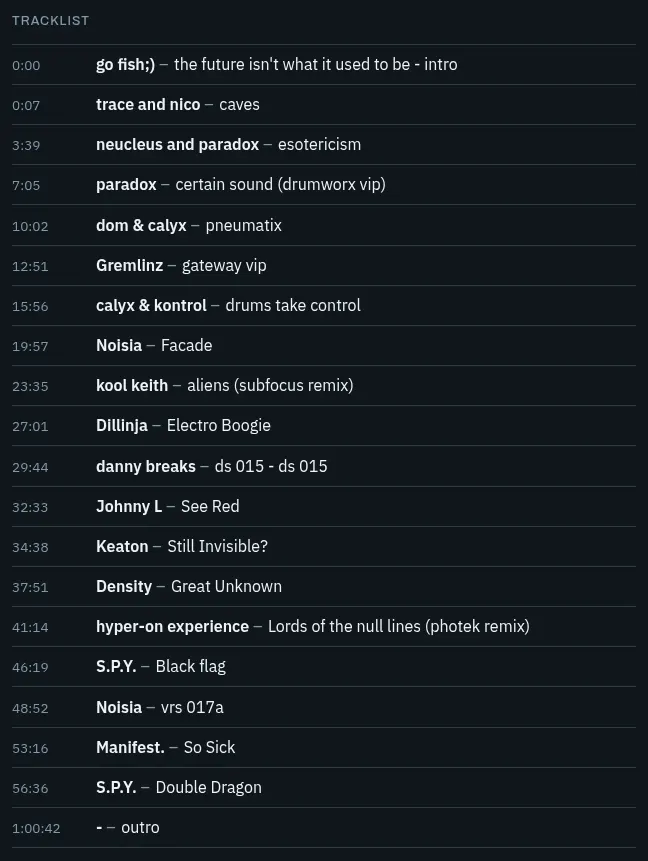
The player
Once something plays, the player stays at the bottom of the screen, on every page, the forum included: the music doesn’t stop when you move around the site.

- Previous, play/pause and next. Previous goes back to the start of the mix if it’s been playing for more than a few seconds.
- The title and the track playing now; tap the title for the mix’s page.
- Tap or drag along the waveform to move through the mix.
- On a computer: volume, Autoplay next mix (on: the next one starts when this one ends), Shuffle and Repeat (off, the whole queue, or this mix). On a phone, shuffle and repeat are in the queue.
- Queue shows what plays next, Compact player makes the bar smaller, and Pop out the player moves it to a small window of its own.
On a phone, the lock screen and headphone buttons work too. With a keyboard, after tapping the waveform: ← → move 10 seconds, Page Up Page Down a minute, Space plays or pauses.
Carrying on where you stopped
When you’re logged in, the site remembers how far into each mix you got, on any device. Start that mix again and it carries on from there, with a Start over button for a few seconds if you’d rather hear it from the beginning.
The queue
Whatever list you pressed play in becomes the queue: when a mix ends, the next one in that list follows (and on into the list’s next pages). Mixes you Add to queue come first, in the order you added them.

In the queue you can take a mix out with its ×, shuffle, repeat, or save the whole queue as a playlist.
Favourites and playlists
Tap the ♡ on a mix (in a list, on its page or in the player) and it’s in My account → Favourites. Tap it again to take it out.
For your own selections, make playlists: on a mix’s page, tap Save to playlist, then tick a playlist, or type a name and tap Create for a new one.

Your playlists are in My account → Playlists. On a playlist’s page, drag the ⠿ handles to change the order, tap × to take a mix out, and use Edit details, sharing or delete to rename it or to let anyone with the link open it (Who can open it: only me, or anyone with the link; then use Share).

Downloads
Where downloads are allowed, a mix’s page has a Download button with the file size. You need to be logged in; downloads may be kept to some forum groups, and there’s a limit per day. If there’s no button, downloading isn’t open to you for that mix.
“You started a lot of tracks”? Starting very many mixes in a short time pauses listening for a little while. Wait a few minutes and carry on.
Something not working, or missing here? Get in touch.